Faceless YouTube Channels: Start, Grow and Get Paid
A complete guide to running a YouTube channel without appearing on camera, from picking a niche and format to staying monetisable under YouTube's inauthentic content policy.
 Andy Woods Updated
A faceless YouTube channel is one where you never appear on screen. The video is narration over something else: stock footage, charts, screen recordings, illustrations, archive images, or text. The voice is yours, a hired narrator's, or text-to-speech.
This guide covers the whole path: the policy that decides whether a faceless channel can earn anything, choosing a niche and a format, writing scripts that hold people without a face to carry them, producing on a budget, and the ways these channels actually make money.
Contents
- The rule that decides everything
- Choosing a niche
- Formats that work without a face
- The script is the product
- Producing on little or no budget
- Your first 20 videos
- Thumbnails without a face
- How faceless channels make money
- Accuracy in finance, health and property
- Mistakes that stall faceless channels
- Launch checklist
The Rule That Decides Everything
Before niche, before equipment, understand one policy. On 15 July 2025 YouTube renamed its "repetitious content" monetisation rule to inauthentic content and clarified what it covers. YouTube's channel monetisation policies now say monetised content should "not be mass-produced, generic, repetitive, or manipulative", and list examples that will not be monetised, including:
- "AI-generated content made with generic or unoriginal templates giving the impression of mass production"
- "Videos where characters are put in the same situation over and over again with the same outcome"
- "Image slideshows, templated storylines, or scrolling text with minimal or no narrative"
YouTube describes this as a clarification of rules that already existed, not a ban on AI tools. Narration by text-to-speech, AI-assisted scripting and stock footage are all still fine. What gets channels demonetised is the combination: the same template, the same structure, and no editorial work, repeated at volume.
In practice that means:
- Every video needs a reason to exist beyond "another one". A new argument, a different story, research the viewer could not get from the last ten uploads.
- Vary the structure. If every video opens the same way, runs the same length and closes the same way, it reads as a template, to viewers and to reviewers.
- Add something only you did. Your selection, your commentary, your research, your editing choices. Curation counts. Pure pasting does not.
- Disclose realistic synthetic content. If a video shows realistic AI-generated people, places or events, YouTube requires a disclosure label. The AI disclosure guide covers when it applies and where the toggle is.
Keep this rule in mind through every section below. A faceless channel that grows but cannot be monetised is a hobby with extra steps.
Choosing a Niche
The niche sets both how much a view is worth and how hard it is to stand out. Look for three things:
- An existing audience on YouTube. Search the topic and check that channels of different sizes get views. If only one giant channel does, the topic may depend on that creator rather than the subject.
- Advertisers and products that want the audience. Topics where viewers are about to spend money (finance, software, business, home, education) attract more advertiser demand than pure entertainment, and give you affiliate options from day one.
- Information you can research and explain. You are not hosting a show. You are explaining something clearly, so you need to understand it well enough to write it down without errors.
Then go narrower than feels comfortable. "Personal finance" is a category. "Index fund investing for people in their thirties who have never invested" is a niche. A narrow niche makes your first hundred viewers feel the channel was made for them, and gives YouTube a clear picture of who to recommend you to.
| Niche | What the visuals are | Main income beyond ads | Watch out for |
|---|---|---|---|
| Personal finance and investing | Charts, screen recordings, simple animations | Brokerage, budgeting and banking affiliates | Accuracy and disclaimers (see below) |
| History and documentary | Public domain images, maps, archive footage | Sponsorships, memberships | Checking image licences |
| Technology explainers | Screen recordings, product shots, diagrams | Software affiliates, often recurring | Content dates quickly |
| Frugal living and saving money | Receipts, spreadsheets, shop footage | Cashback and budgeting app affiliates | Region-specific prices |
| Food education (no-camera cooking) | Top-down hands-only footage, ingredient close-ups | Kitchen gear affiliates | Needs some filmed footage |
| Health and wellness education | Diagrams, stock footage | Sponsorships | YouTube's medical misinformation policy |
| Real estate education | Listings footage, maps, calculators | Property software and course affiliates | Not giving personal advice |
| Business and accounting basics | Screen recordings, templates | Software affiliates, templates | Country-specific rules |
| Story narration (Reddit, forums) | Gameplay or ambient footage with text cards | Mostly ads | The inauthentic content rule, most directly |
| Poetry and literature readings | Portraits, text, public domain art | Memberships, merchandise | Rights to modern texts |
Some narrow professional topics get little attention from creators because they sound dull: insurance explained, wills and estate planning, supply chain and logistics, farm economics, accessibility law, bookkeeping for small businesses. Their audiences are small but search with a clear purpose, and few channels serve them well. For more on which niches suit AI-assisted production specifically, see the niches guide.
Formats That Work Without a Face
Most faceless channels use one of a handful of formats. Pick one to start and do it consistently.
The narrated explainer. Five to fifteen minutes of voiceover over supporting visuals, answering one question. This is the backbone of finance, history, tech and business channels. It works best when the visuals change often and actually show what is being said.
Story narration. A written story, often a Reddit post and its comments, read over background footage with the text on screen. It is cheap to produce and popular on Shorts. It is also the format closest to what the inauthentic content policy describes, so channels that last usually add something: their own selection and editing of stories, commentary between posts, or a recurring theme that makes each video distinct. The Reddit story format guide shows a full example.
Readings. Poetry, speeches, letters and public domain literature, narrated with the text revealed line by line. The text does the work, and public domain sources are free to use.
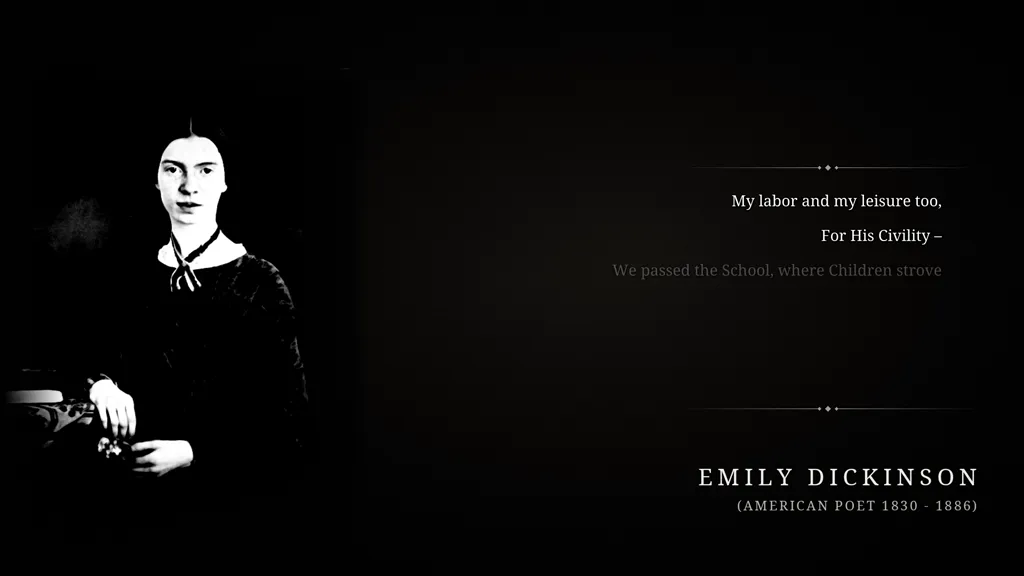
A frame from a poem reading made with InkSlop. Each line appears as it is narrated, so the video has a narrative spine rather than being a static slideshow. The narration is an AI voice.
The list or ranking video. "Seven mistakes first-time landlords make." Easy to structure and easy to title, but the most templated format of all, so the research in each entry has to carry it.
Data and chart videos. A number that changes over time, animated and explained. Strong for finance, economics and sport, and hard for others to copy because it depends on your research.
Shorts. Any of the above cut to under a minute. Shorts bring subscribers faster but pay far less per view. Most channels use them as a trailer for their long videos rather than as the main product.
The Script Is the Product
On a camera channel, personality carries a lot. People come back for the person. On a faceless channel the script has to do that work alone.
Good faceless scripts are:
- Specific. "Most people overpay on fees" loses to a worked example with real numbers. Specifics show that research happened and give people a reason to keep watching.
- Front-loaded. The first ten seconds decide whether someone stays. State what the video will give them, then start delivering it. Background comes later, if at all. The hooks guide covers opening lines in detail.
- Paced. Short sentences read aloud better, especially with text-to-speech. Cut every sentence that does not move the video forward.
- Written for the ear. Read the script out loud before you produce it. If you stumble, the narrator will too.
AI can draft a script from a description, and that is a reasonable starting point. The value you add is the editing: checking facts, replacing generic claims with specific ones, and rewriting the opening. That editing is also what keeps a channel on the right side of the inauthentic content rule.
Producing on Little or No Budget
A faceless channel can start at close to zero cost. What you need, and the free or cheap options:
- Voice. Your own voice with a phone and a quiet room, a cheap USB microphone, or text-to-speech. Open models like Kokoro now produce clear, natural narration and run on an ordinary computer. We wrote up what running Kokoro in production taught us.
- Visuals. Free stock sites, public domain archives, your own screen recordings, and simple charts. Check each source's licence, and credit CC BY material correctly. The CC BY attribution guide has the exact format.
- Music. Use music that is cleared for commercial use. Uncleared tracks lead to Content ID claims, which can send your ad revenue to the rights holder.
- Editing. DaVinci Resolve and CapCut are free. Or skip the timeline and use a tool that assembles the video from the script.
- Thumbnails. Canva's free tier or any image editor.
- Research. YouTube search suggestions, Google's "People also ask", and your own YouTube Studio analytics.
InkSlop covers the production and publishing steps. You write or generate the script, pick a voice and background from a pre-cleared library, render, and schedule the upload to YouTube or TikTok from the same place. Credits for CC BY tracks are filled into the description for you. A 60-second narrated video costs about 3 credits, under €0.40 on the Starter plan. The cost breakdown has the numbers for longer videos and other voices.
Your First 20 Videos
YouTube learns who to show your videos to by watching who watches them. A new channel has no data yet, so the first twenty uploads are as much about teaching the algorithm as about views.
Make those twenty videos:
- In one niche. Twenty related sub-topics, not twenty subjects.
- Aimed at specific searches. Long, specific questions people actually type are easier to rank for than broad topics.
- Consistent in look and sound. Same voice, same thumbnail style, same kind of structure, while each video still earns its place (see the policy above).
- At a steady pace. Two a week gets you to twenty in ten weeks. At one a month you would wait more than a year for the same data.
To keep ideas coming, run this loop every week:
- Type your niche's core terms into YouTube search and note the autocomplete suggestions that show clear intent.
- Search Google with "how to", "what is" and "why does" in front of those terms and read the "People also ask" boxes.
- Look at similar channels and note which of their videos beat their usual view count. Those topics are proven.
- In YouTube Studio, open Analytics, then the traffic source "YouTube search", to see which searches find your videos. Make more videos in those clusters.
Keep a simple spreadsheet for each video: topic, length, click-through rate, average percentage viewed. After twenty videos you will see which topics and openings work. Most channels see little in the first month or two. The ones that stop at that point never find out what month six looks like.
Batching makes the schedule sustainable: write and produce a week or two of videos in one sitting, then schedule them. The batch production guide walks through a weekly routine.
Thumbnails Without a Face
Faces with strong expressions are the default thumbnail tool, and you do not have one. What works instead:
- The outcome, in a few words. A number or result: "Paid off in 11 months", "3% a year, forever". Three to five words, readable on a phone.
- A chart. A rising line, a bar that dwarfs another, a percentage ring. It tells the viewer at a glance that there is data inside.
- One strong image of the tension. Right way versus wrong way, before versus after, one object that stands for the story.
- A consistent style. The same colours, font and layout on every thumbnail. By the fourth video, returning viewers recognise yours before they read the title.
How Faceless Channels Make Money
A camera is not required for any of the usual income streams.
YouTube Partner Program. According to YouTube's eligibility page and the expanded programme overview, there are two thresholds:
| Threshold | What it unlocks |
|---|---|
| 500 subscribers, 3 public uploads in the last 90 days, and either 3,000 public watch hours in the last 12 months or 3 million Shorts views in the last 90 days | Fan funding: channel memberships, Super Thanks, Super Chat and Super Stickers, plus some Shopping features. Available in eligible countries. |
| 1,000 subscribers and either 4,000 public watch hours in the last 12 months or 10 million Shorts views in the last 90 days | Ad revenue sharing and YouTube Premium revenue |
What a view earns varies a lot by niche, by where viewers live and by time of year. Advertisers pay more in the final quarter and for audiences about to spend money. Treat any single RPM figure you see online as one channel's experience, not a forecast.
Affiliate links. Available from your first video, with no subscriber minimum. A video comparing budgeting apps links to those apps. A software walkthrough links to the software. For informational channels this often earns more than ads, especially with software that pays recurring commission. Always disclose affiliate links in the description.
Sponsorships. Brands care about who is watching, not who is talking. A small channel in a narrow, commercial niche can attract sponsors before a much larger entertainment channel does. Keep a one-page media kit with your audience, average views and topics ready.
Digital products. Templates, spreadsheets, checklists and guides that match what your videos teach. A finance channel can sell a budget template, a small-business channel a set of invoice templates. You make them once and sell them for as long as the videos bring people in.
Accuracy in Finance, Health and Property
These are some of the most valuable faceless niches, and the ones where mistakes cost viewers real money or harm their health. They also get stricter treatment from YouTube.
- Source every number. Tax limits, interest rates, contribution caps and dosages come from official sources such as government sites and regulators, and are checked before publishing.
- Date content that expires. If a video uses this year's limits, say so on screen and in the title or description, and update or replace it when the numbers change.
- Educate, do not prescribe. "Research links these eating patterns with lower heart risk" is education. "Eat these five foods to fix your heart" is medical advice. The same goes for "how landlords assess yields" versus "buy this property".
- Add a clear disclaimer at the start of the video and in the description: the content is educational and not financial, medical or legal advice.
- Follow YouTube's medical misinformation policy. Health content that contradicts established medical guidance can be removed and can put the whole channel at risk.
Mistakes That Stall Faceless Channels
- A broad channel. "Interesting facts" about history, money, space and cooking tells YouTube nothing about who to recommend it to.
- Weak audio. Viewers forgive plain visuals much more easily than muddy or robotic sound. With today's narration tools there is no reason for bad audio.
- The same video fifty times. Identical structure, length and opening across every upload is exactly the pattern the inauthentic content policy describes.
- Ignoring titles and descriptions. Say clearly what the video answers, using the words people search for.
- Bursts instead of a schedule. Three videos a week for a month is better than ten in one week and then nothing.
- Quitting before the data arrives. The first twenty videos teach you, and YouTube, what the channel is.
Launch Checklist
- One narrow niche, checked against existing channels and advertisers
- One format to start with
- A voice (your own, hired, or TTS) and a thumbnail style you will keep
- A list of 30 specific video topics from the research loop
- Licences checked for every visual and music source
- Disclaimers written, if you are in finance, health or property
- Two videos a week scheduled for the first ten weeks
- A spreadsheet to track click-through rate and percentage viewed
If you want to see how quickly a script becomes a finished video, try the creator with the first topic on your list.