Open Source TTS in Production: What We Learned Running Kokoro on CPU
Kokoro is an 82M parameter TTS model that runs on CPU, costs under $1 per million characters, and produces word-level timing data. Here is what running it inside Celery workers actually looks like.
 Andy Woods Updated
When we were evaluating TTS engines for InkSlop, the practical requirements were: runs at acceptable speed on CPU, produces word-level timing for subtitle sync, open license, and cheap enough to include in all plans without credit deduction.
Kokoro (hexgrad/Kokoro-82M, Apache 2.0) met all four: it is small enough to run on CPU, it reports word timings, and its licence allows commercial use. Running it in production inside a Celery worker pool taught us a few non-obvious things.
The CUDA Fork Problem
Celery workers use fork-based process spawning by default. CUDA does not survive a fork cleanly. If you initialise a CUDA-using model in the parent process and then fork workers, the CUDA context in child processes is in an undefined state. This causes silent errors, hangs, or crashes depending on the driver version and how lucky you are.
The options are:
- Force CPU everywhere
- Use spawn instead of fork for Celery workers (slower startup, different memory model)
- Run a separate GPU inference service that workers call via HTTP
We chose option 1. InkSlop's Celery workers force device='cpu' in KPipeline regardless of what hardware is available. The performance hit is real but acceptable. We measured it on a six-core laptop CPU from 2018 (Intel i7-8850H): with PyTorch's default six threads, Kokoro generates speech about twice as fast as real time, so 60 seconds of narration takes around 28 seconds. Limited to a single thread, it runs at roughly real time.
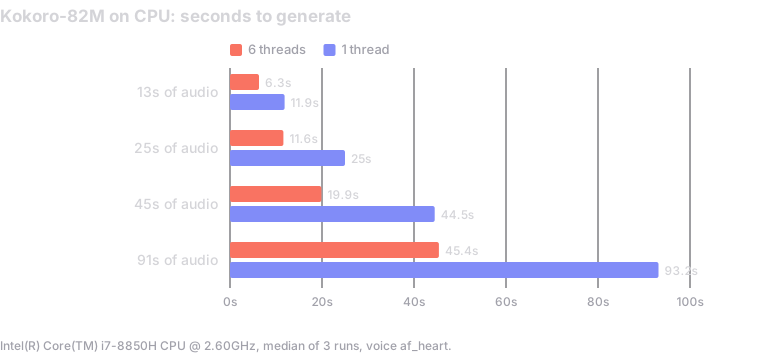
Server CPUs with more and faster cores do better, but the single-thread number is the one to plan around when several workers share a machine, because each worker only gets a slice of it. Benchmark on your own hardware before deciding.
If you are building a high-throughput TTS service and GPU efficiency matters more, option 3 (a dedicated TTS service with its own process lifecycle) is the clean solution. It adds complexity but it solves the problem properly.
Model Initialisation and Worker Memory
The KPipeline instance is relatively cheap to initialise compared to larger models, but it is not free. In our benchmark, creating the pipeline took about 2.5 seconds, plus some memory.
We initialise the engine inside the Celery task, not at module import time. This means each task invocation that needs Kokoro creates an engine instance. The tradeoff: no warm state between tasks, but no memory held in idle workers and no init-time errors during worker startup.
For high-volume deployments, a worker-level singleton (initialised once per worker process rather than once per task) would be more efficient. We have not needed it yet because Kokoro's init overhead is small relative to the actual generation time.
Word-Level Timing: What Kokoro Gives You
One of Kokoro's most useful production features is that KPipeline yields token objects with timestamps. Each token includes start and end times, which InkSlop uses directly to generate subtitle segments without a separate transcription step.
The raw token data has a few quirks that need handling:
Punctuation tokens. Commas, periods, and other punctuation often arrive as separate tokens with no timestamps. The sensible behaviour is to append them to the previous word token rather than drop them or create standalone subtitle entries with no timing. Our implementation does this: if a token is punctuation and has no timestamps, it extends the text of the previous subtitle entry.
Missing timestamps on non-punctuation tokens. Occasionally a word token arrives with null start or end timestamps. We skip these rather than attempting to interpolate, because interpolated timestamps produce subtitle flicker that is more noticeable than a missing word.
Chunk boundary timing. KPipeline generates audio in chunks. The start time for each chunk needs to be accumulated correctly: chunk N's timestamps are relative to the start of chunk N, not the start of the whole audio. We track a running start_time offset and add it to each token's timestamps.
Audio duration vs token end time. The last token's end time does not always match the actual audio duration. We use the real audio duration (len(audio) / sample_rate) rather than the last token's timestamp for the segment's total duration.
Subtitle Grouping
Raw word-level subtitles are not directly usable for display. Showing one word at a time creates jitter. Showing too many words at once means they disappear before they can be read.
InkSlop's subtitle engine groups word tokens into readable phrases. Two strategies work well: group by a fixed word count (3 to 5 words), or group by natural phrase boundaries using punctuation as a guide. The punctuation approach produces more natural-looking subtitles but requires the punctuation appending from the previous point to work correctly.
For long-form narration, phrase-boundary grouping with a maximum of 6 words per subtitle reads better. For fast-paced short-form content, 3 to 4 words per subtitle keeps pace with the speech.
Voices and Quality Notes
Kokoro has a handful of voices worth knowing about in practice:
af_bellaandaf_heartare the two most consistently clear female American voices. Heart has slightly more warmth; Bella is more neutral. Both work well for narration.am_michaelis the most reliable male American voice for long-form narration.- Language coverage includes American and British English, Spanish, French, Hindi, Italian, Japanese, Brazilian Portuguese, and Mandarin Chinese.
The voice quality is surprisingly consistent across the library given the model size. The main weakness is emotional range: Kokoro does not handle scripted emotion well. Narration that is meant to sound excited, sad, or urgent comes out flat. For content that needs expressive delivery, a model that takes style instructions, such as MiMo, is the better choice.
What It Costs
At InkSlop's credit rates, Kokoro TTS costs 0.5 credits per 1,000 characters of script. In raw infrastructure terms, the cost is under $1 per million characters when served via API, or roughly CPU time at whatever your compute rate is if you run it locally.
For a 150-word script (approximately 800 characters), Kokoro TTS adds 0.4 credits on top of the 2 credits of render time for a 60-second video. The full per-video breakdown has the other engines.
The Case for Running It Yourself
If you are building a content pipeline and want TTS that does not depend on a third-party API, that runs with no network call, and that produces timing data you can use directly: Kokoro is worth running locally. The Apache 2.0 license allows commercial use without restriction. The model is small enough to ship inside a container. The quality is production-grade for narration use cases.
The main gotcha is the fork-safe deployment pattern. Decide upfront whether you are doing CPU-only, separate TTS service, or spawn-based workers, and design for it from the start. Retrofitting fork safety into a running worker pool is harder than building it in.
The model is on Hugging Face and the Python package is kokoro on PyPI. The documentation is minimal but the API is simple: instantiate KPipeline, call it with text and a voice name, iterate the generator.